Overview
The visual UI problems exist in the game, but they are symptoms. The underlying issue is structural: the game's economy and progression design ato change that?
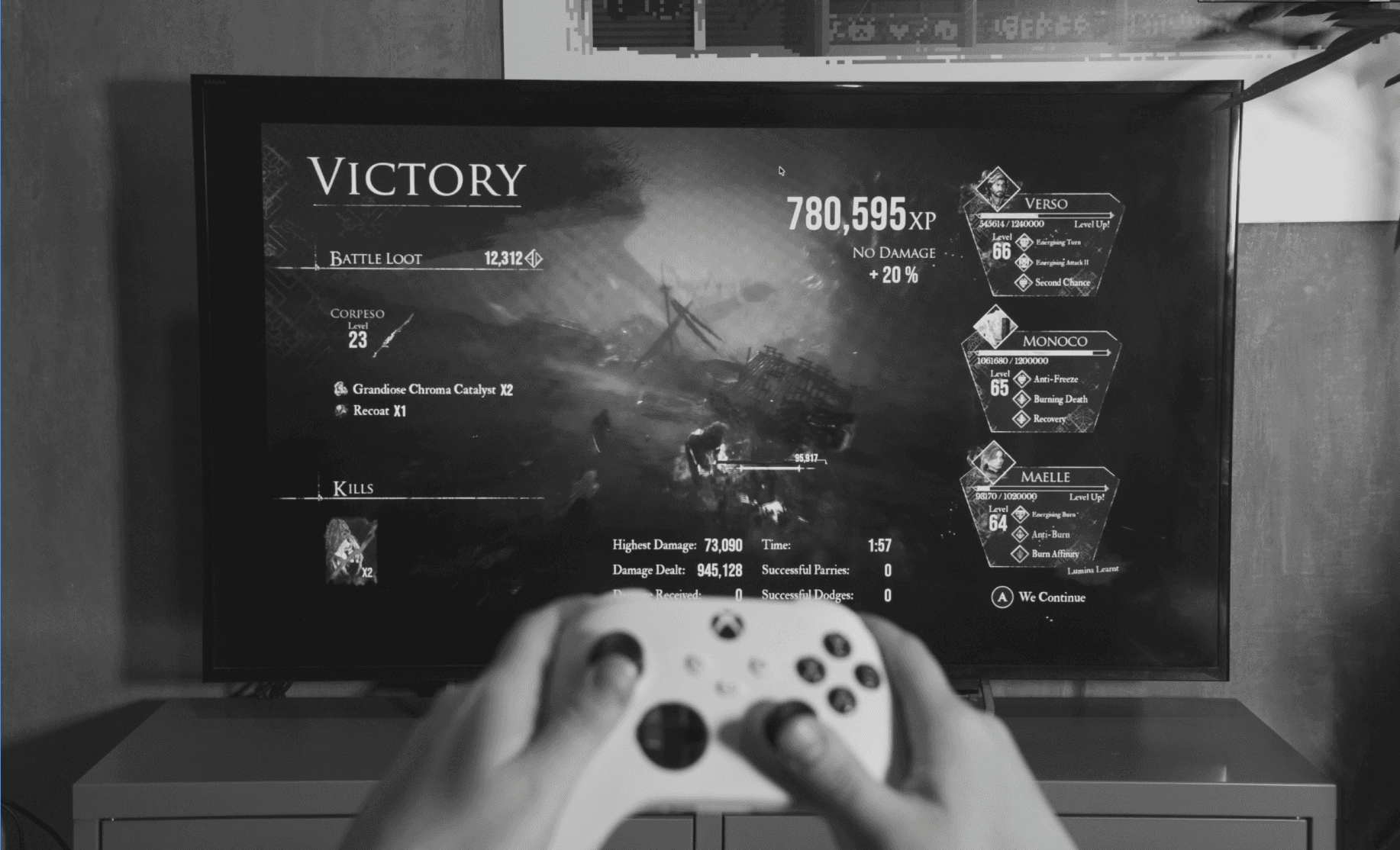
While playing Clair Obscur: Expedition 33 (Sandfall Interactive, 2025) from roughly two to three meters away from my TV, I noticed that the post-battle victory screen was difficult to read. Everything was there, but text scaled unpredictably across cards, making the screen hard to scan at TV distance. I had to lean forward to understand what my characters had actually learned and gained.
What looked like a local readability issue turned out to expose several structural UX questions much earlier in the design process. The post-battle screen became an entry point into a broader question: which rules should UX define before UI art begins, so the same problems do not have to be solved screen by screen later?
The friction wasn’t isolated to my own playthrough and setup. After combat, the player needs to confirm the outcome, understand what they earned, decide whether any of it changes their build, and return to gameplay. Looking at player feedback on Steam, the same friction appears in several forms:
Difficulty reading UI at couch and TV distances
Trouble reading pickups and menu content
Difficulty finding newly acquired items later
For one player, the text size was enough to refund the game
These reports don’t validate a specific solution, but they helped check that the friction I observed wasn’t isolated to my own setup. Taken together, they also point to a broader pattern: players can struggle not only to read reward information, but to understand and find it again across the interface.
Readability was only part of the problem. Even when a reward could be read, its meaning was not always immediately clear.
Expedition 33 relies heavily on its own terminology across loot and progression. Familiar RPG concepts often have game-specific names, such as Chroma Elixir instead of Health Potion, alongside systems like Pictos and Luminas. Early in the game, before this vocabulary becomes familiar, names alone do not always tell players what they earned, what it does, or whether it matters to their build. That makes post-battle rewards harder to evaluate and can push players into the inventory just to understand what dropped.
Looking beyond the victory screen revealed a broader issue. The victory screen was a useful starting point because it brings together much of the information that later reappears elsewhere: characters, progression, equipment, Pictos, rewards, and item attributes. Solving their hierarchy here gave me a compact place to define rules that could later extend into inventory, merchants, and pickup states.
The same weapons and items also appear in the inventory, merchant shop, and HUD pickup notifications, but they are presented with different levels of detail and hierarchy. So the design problem shifted from redesigning one screen to defining an information model that could keep rewards readable and recognizable across contexts.
When UI Fails — Even for “Perfect Vision”
Note
Gamers with vision problems say in surveys that they get headaches, eye strain, and need to take breaks because their eyes are tired. A review of 38 studies found that almost 19% of student gamers have visual strain while or after game session.
When we talk about accessibility in games, it’s usually about more serious vision impairments — blindness, low vision, or color blindness. These are important issues, and the industry has made real progress here. But accessibility isn’t only about edge cases. In reality, a huge part of the gaming audience deals with common vision conditions — nearsightedness, farsightedness, astigmatism. Even players with corrected or “perfect” vision can struggle with UI when the text is small, contrast is low, or everything feels too tightly packed.
I've learnt to pay great attention to visual clarity while working on digital products. Font sizes, contrast ratios, and spacing are not "nice to have" elements; rather, they are essential components of a user-friendly interface. WCAG and other accessibility requirements make ensuring that interfaces are legible and useful across a range of devices and circumstances. Because of this, it frequently catches my attention when games, even ones that I genuinely like, don't adhere to these similar guidelines. And when that occurs, it leads to conflict that could have been prevented with a little more attention to how people actually see.
There are are some of the best games ever made — and yet even they show how visual clarity can still be improved. It’s not a failure — it’s a reminder. A reminder that even in great games, small design details like font size, spacing, or distance readability have a real impact on how players experience the game.
Overview
The visual UI problems exist in the game, but they are symptoms. The underlying issue is structural: the game's economy and progression design ato change that?
While playing Clair Obscur: Expedition 33 (Sandfall Interactive, 2025) from roughly two to three meters away from my TV, I noticed that the post-battle victory screen was difficult to read. Everything was there, but text scaled unpredictably across cards, making the screen hard to scan at TV distance. I had to lean forward to understand what my characters had actually learned and gained.
What looked like a local readability issue turned out to expose several structural UX questions much earlier in the design process. The post-battle screen became an entry point into a broader question: which rules should UX define before UI art begins, so the same problems do not have to be solved screen by screen later?
The friction wasn’t isolated to my own playthrough and setup. After combat, the player needs to confirm the outcome, understand what they earned, decide whether any of it changes their build, and return to gameplay. Looking at player feedback on Steam, the same friction appears in several forms:
Difficulty reading UI at couch and TV distances
Trouble reading pickups and menu content
Difficulty finding newly acquired items later
For one player, the text size was enough to refund the game
These reports don’t validate a specific solution, but they helped check that the friction I observed wasn’t isolated to my own setup. Taken together, they also point to a broader pattern: players can struggle not only to read reward information, but to understand and find it again across the interface.
Readability was only part of the problem. Even when a reward could be read, its meaning was not always immediately clear.
Expedition 33 relies heavily on its own terminology across loot and progression. Familiar RPG concepts often have game-specific names, such as Chroma Elixir instead of Health Potion, alongside systems like Pictos and Luminas. Early in the game, before this vocabulary becomes familiar, names alone do not always tell players what they earned, what it does, or whether it matters to their build. That makes post-battle rewards harder to evaluate and can push players into the inventory just to understand what dropped.
Looking beyond the victory screen revealed a broader issue. The victory screen was a useful starting point because it brings together much of the information that later reappears elsewhere: characters, progression, equipment, Pictos, rewards, and item attributes. Solving their hierarchy here gave me a compact place to define rules that could later extend into inventory, merchants, and pickup states.
The same weapons and items also appear in the inventory, merchant shop, and HUD pickup notifications, but they are presented with different levels of detail and hierarchy. So the design problem shifted from redesigning one screen to defining an information model that could keep rewards readable and recognizable across contexts.
When UI Fails — Even for “Perfect Vision”
Note
Gamers with vision problems say in surveys that they get headaches, eye strain, and need to take breaks because their eyes are tired. A review of 38 studies found that almost 19% of student gamers have visual strain while or after game session.
When we talk about accessibility in games, it’s usually about more serious vision impairments — blindness, low vision, or color blindness. These are important issues, and the industry has made real progress here. But accessibility isn’t only about edge cases. In reality, a huge part of the gaming audience deals with common vision conditions — nearsightedness, farsightedness, astigmatism. Even players with corrected or “perfect” vision can struggle with UI when the text is small, contrast is low, or everything feels too tightly packed.
I've learnt to pay great attention to visual clarity while working on digital products. Font sizes, contrast ratios, and spacing are not "nice to have" elements; rather, they are essential components of a user-friendly interface. WCAG and other accessibility requirements make ensuring that interfaces are legible and useful across a range of devices and circumstances. Because of this, it frequently catches my attention when games, even ones that I genuinely like, don't adhere to these similar guidelines. And when that occurs, it leads to conflict that could have been prevented with a little more attention to how people actually see.
There are are some of the best games ever made — and yet even they show how visual clarity can still be improved. It’s not a failure — it’s a reminder. A reminder that even in great games, small design details like font size, spacing, or distance readability have a real impact on how players experience the game.

